React Information Flow
✅ Objectives
Define the term “lifting state”
Revisit our component hierarchy and describe the Flow of Information
Decide which components should have state
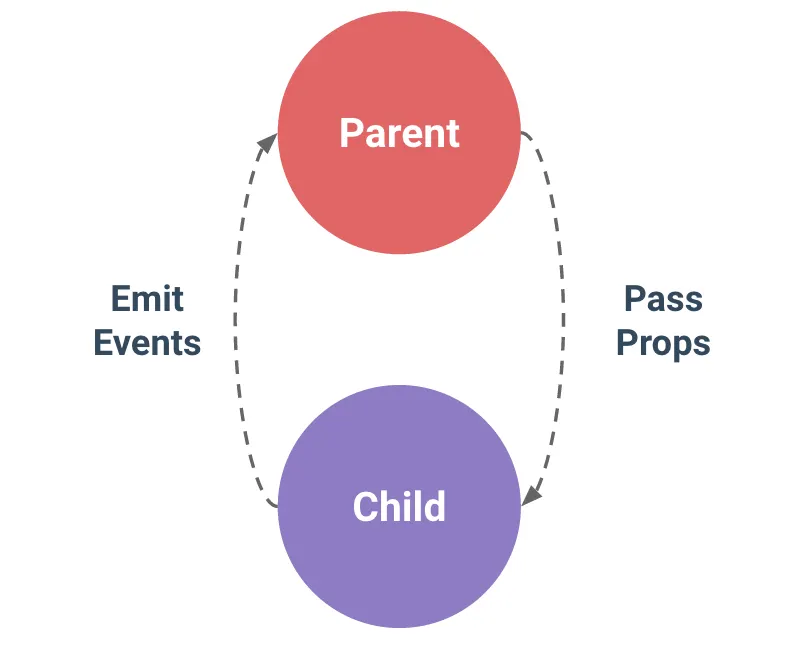
Pass data up with callbacks (after an event), and down data with props
Deliverables
1. Add a button to our App that will use json-server to fetch projects and store them in state
2. Use Inverse Data flow to implement Light-Dark mode
3. Refactor the filter component out of ProjectList and implement inverse data flow
Deliverable 1. Add a button to our App that will use json-server to fetch projects and store them in state
a prop or a state?
Add a button ‘Load Projects’ to the JSX of the
AppcomponentAdd a ‘click’ event to the button
When the button is clicked, make a fetch request to “http://localhost:4000/projects” and set the
projectsstate to the value returned by the response
Current Data Flow
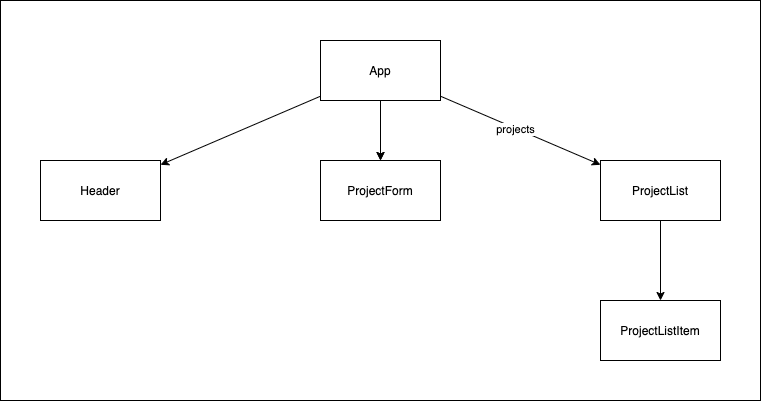
💡 Question: Where should state be?
Deliverable 2: Lifting the darkMode state up 🔧
Currently, we have our isDarkMode state within the Header component.
What’s the problem with that? If we want to update the style of the entire application as it changes, we will only cause a re-render to
Headercomponent and its children
Deliverable 2: Lifting the darkMode state up 🔧
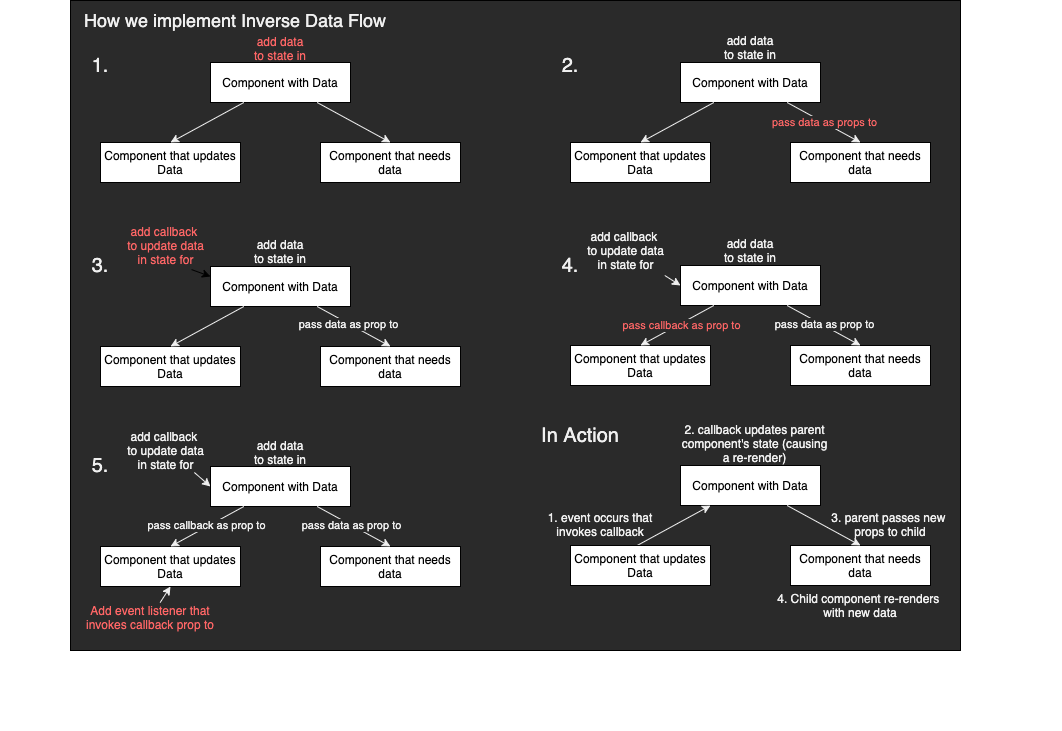
Use Inverse Data flow
Refactor isDarkMode state from the
Headercomponent to theAppcomponent.Create a callback function that updates
isDarkModeand pass the callback function as a prop to theHeadercomponentInside the
Headercomponent, invoke the callback function in place of updating the state
Let’s fix it! 😸
Lift the
isDarkModestate to theAppcomponent.Create a function
onToggleDarkModethat will handle updating the value ofisDarkModewhen necessaryPass
isDarkModedown as a prop to theHeadercomponent to use as the condition for what text the button will renderPass
onToggleDarkModeto be used as a callback function when the button is clicked
❓ Why? This allows us to maintain the state and manage its value where the state is defined
🤔 Decisions - Where should state be?
To decide where state should live, for each piece of state in your application:
Identify every component that renders something based on that state.
Find a common parent component (a single component above all the components that need the state in the hierarchy).
Either the common parent or another component higher up in the hierarchy should own the state.
If you can’t find a component where it makes sense to own the state, create a new component solely for holding the state and add it somewhere in the hierarchy above the common parent component.
Diagram
Recap
First, move the isDarkMode to the App component:
const App = () => {
  const [projects, setProjects] = useState([]);
  const [isDarkMode, setIsDarkMode] = useState(true);

...
Second, create the onToggleDarkMode function that will update the isDarkMode state:
const onToggleDarkMode = () => setIsDarkMode(!isDarkMode);
Third, pass both isDarkMode and onToggleDarkMode to Header as props
<Header isDarkMode={isDarkMode} onToggleDarkMode={onToggleDarkMode} />
Inside the Header component:
Destructure the props in the argument and use the variables to render the button text and as a callback for the onClick event:
const Header = ({ isDarkMode, onToggleDarkMode }) => {
  const handleClick = () => onToggleDarkMode();

  const buttonTextContent = isDarkMode ? "Light Mode" : "Dark Mode";

  return (
    <header>
      <h1>
        <span className="logo">{"//"}</span>
        Project Showcase
      </h1>
      <button onClick={handleClick}>{buttonTextContent}</button>
    </header>
  );
};

export default Header;
Lifting State Up ⬆️
“Sometimes, you want the state of two components to always change together. To do it, remove state from both of them, move it to their closest common parent, and then pass it down to them via props. This is known as lifting state up, and it’s one of the most common things you will do writing React code.”
https://react.dev/learn/sharing-state-between-components#lifting-state-up-by-example
Deliverable 3. Refactor the filter component out of ProjectList and implement inverse data flow
Refactor the
searchQuerystate and the filter method inside of theProjectListcomponent to theAppcomponentUsing inverse data flow, get the value of the input field UP to the App component
Write a callback function inside the App component:
the function should take in a new search value and set state with that value
pass the callback function down as a prop to
ProjectList
Call the callback function from the onChange event listener
💡 Conclusion:
Lifting state up allows us to share data across different components without having to redefine that state where it is needed. The lowest common parent component is the best place to create the state and the process of sharing the data is done through the passing of props.
💡 Conclusion:
Because this data is now created elsewhere, we also have to be mindful of how the state is managed. Best practice is to always maintain and manage state where it has been defined. In order to do so successfully if behavior lives in a child component but state belongs to a parent component, is through inverse data flow.
💡 Conclusion:
This means creating a callback function in the parent component that will be responsible for updating the state and passing it down as a prop to the child component with the behavior.
A single source of truth for each state
In a React application, many components will have their own state. Some state may “live” close to the leaf components (components at the bottom of the tree) like inputs. Other state may “live” closer to the top of the app. For example, even client-side routing libraries are usually implemented by storing the current route in the React state, and passing it down by props!
A single source of truth for each state
For each unique piece of state, you will choose the component that “owns” it. This principle is also known as having a “single source of truth”. It doesn’t mean that all state lives in one place—but that for each piece of state, there is a specific component that holds that piece of information. Instead of duplicating shared state between components, lift it up to their common shared parent, and pass it down to the children that need it.
A single source of truth for each state
Your app will change as you work on it. It is common that you will move state down or back up while you’re still figuring out where each piece of the state “lives”. This is all part of the process!
Recap
- When you want to coordinate two components, move their state to their common parent.
- Then pass the information down through props from their common parent.
- Finally, pass the event handlers down so that the children can change the parent’s state.
- It’s useful to consider components as “controlled” (driven by props) or “uncontrolled” (driven by state).