🚗 React Roadmap
The goals for Phase 2:
Create a static frontend site with components and props (DOM Manipulation)
Use state and events to make your site dynamic (Event Handling)
Add side effects and data fetching to communicate with a server (Network Communication)
Components and Props
✅ Objectives
✳️ Discuss the benefits of React over Vanilla JS
✳️ Explain the importance of Components
✳️ Practice writing components
✳️ Define props and how to create them
✳️ Recognize destructured props and how to work with them
✳️ Recognize best practices when writing components and props
✳️ Render multiple components from a list
💡 React Philosophy
- Use declarative syntax (JSX)
- Makes it easier to work with the DOM
- Establish a clear connection between the code we write and what is displayed in the browser
- Use components to break down complex UI into smaller pieces, creating a better separation of concerns
- Facilitate easier to maintenance
React > Vanilla JS
Instead of describing how to do something (imperative):
const h1 = document.createElement("h1");
h1.id = "main";
h1.className = "blue";
h1.textContent = "Hello!";
We can just describe what we want (declarative):
const h1 = (
  <h1 id="main" className="blue">
    Hello from JSX!
  </h1>
);
⚙️ Components
Components are the building blocks of React. A component is a function that:
- Takes in some raw data (props)
- Returns user interface (JSX)
const Header = () => {
  return (
    <div>
      <h3>Hello World</h3>
    </div>
  );
};

ReactDOM.render(<Header />, document.getElementById("root"));
⚙️ Component Gotchas
This is okay:
function Card() {
  return (
    <div id="card1" className="card">
      <h1>hi</h1>
      <p>wassup?</p>
    </div>
  );
}
This is NOT okay:
function card() {
  return (
    <h1>hi</h1>
    <p>wassup?</p>
  )
}
- Component name needs to be capitalized
- Components can only return one element
☕️☕️☕️☕️☕️☕️☕️☕️
Break!
👩🏻💻👩🏻💻👩🏻💻👩🏻💻👩🏻💻👩🏻💻👩🏻💻👩🏻
🥸 Props!
// Inside of a parent component
return (
  <div>
    <Card greeting="hi" subGreeting="hello" />
    <Card greeting="sup" subGreeting="what's up" />
  </div>
);

//a child component
function Card(props) {
  return (
    <div id="card1" className="card">
      <h1>{props.greeting}</h1>
      <p>{props.subGreeting}</p>
    </div>
  );
}
🥸 Props!
When you create components, one way to make them dynamic and reusable is by passing in props. For example, if we wanted to create several cards on our page using a Card component, we could do so like above:
🥸
function Card(props) {
  console.log(props); // => { greeting: "hi", subGreeting: "hello" }

  return (
    <div id="card1" className="card">
      <h1>{props.greeting}</h1>
      <p>{props.subGreeting}</p>
    </div>
  );
}
🥸 Props Continued
The props argument in our Card component defines an object that React will pass to our function when it is called, and it will use whatever attributes we add to our JSX component as key-value pairs on that props object.
For example, if we were to add a console.log in the Card component above, we’d end up seeing this object:

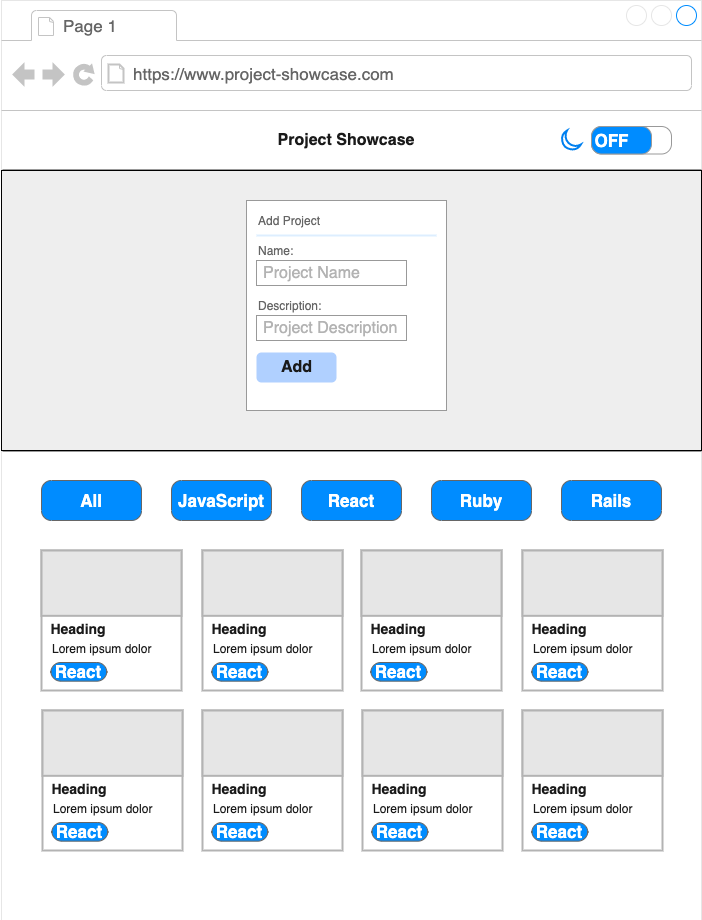
Wireframe